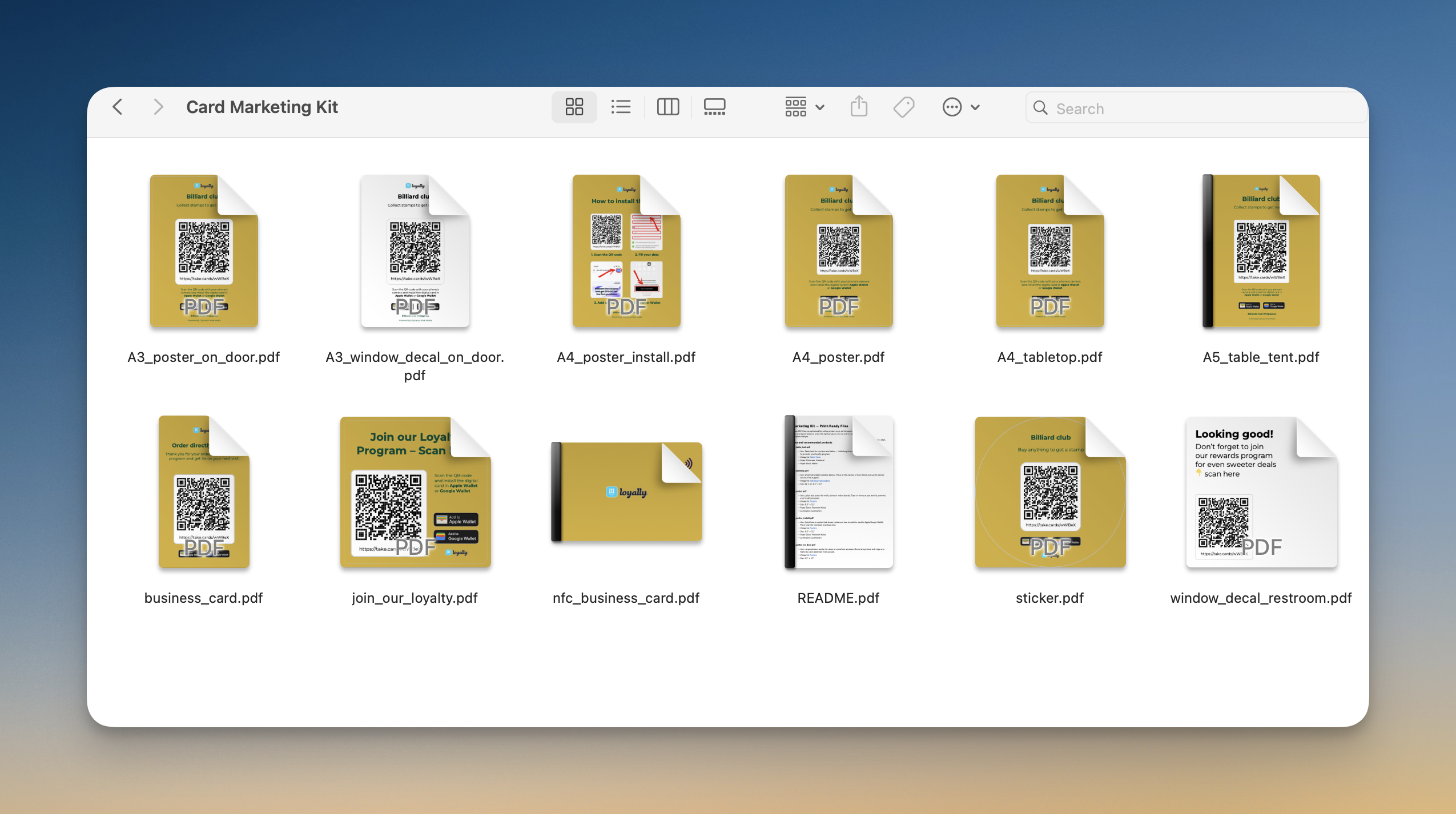
A Card Marketing Kit is a collection of print-ready PDF files specifically designed to help you promote your digital loyalty program within your physical store. These files are optimized for professional online printers like Vistaprint to ensure high-quality results for various display types, such as posters, stickers, and table tents.
Each design includes embedded or outlined fonts and colors for maximum reliability, allowing you to create professional marketing assets without needing a graphic designer.
The downloaded ZIP file contains everything you need to bridge the gap between your physical location and your digital card, including:
QR Codes - High-resolution versions of your card's unique QR code for posters, business cards, or table tents.
Digital Assets - Graphics optimized for sharing on social media or via email.
Customer Guides - Simple visual instructions to help your customers add the card to their Apple Wallet or Google Pay.
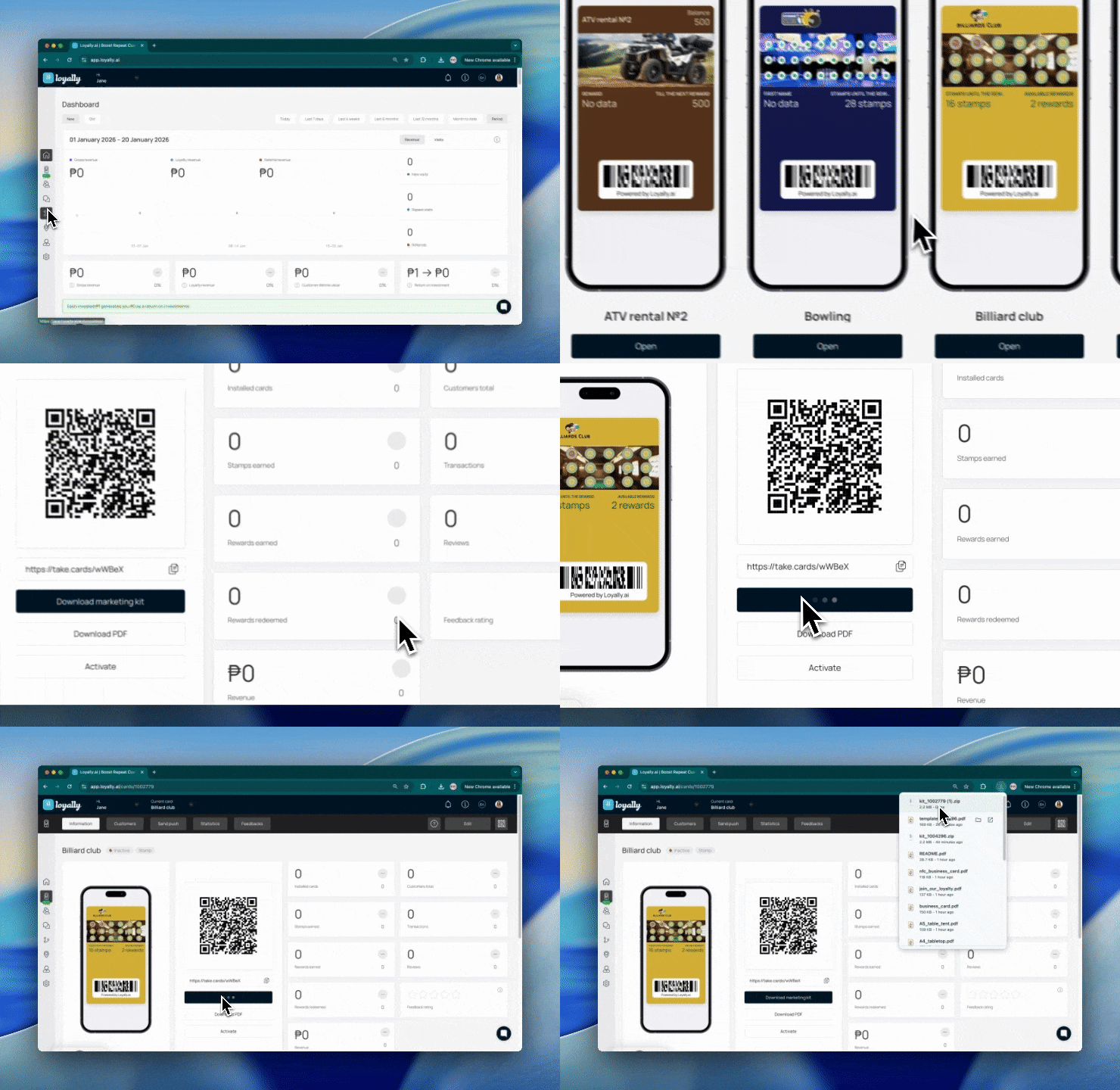
Once you have designed and published your digital loyalty card, the next step is to get it in front of your customers. Loyally provides a comprehensive Marketing Kit for every card you create, containing high-quality QR codes and promotional assets.
Go to the app.Loyally.ai enter your credentials to access your dashboard.
In the main menu panel (usually located on the left side of your screen), click on ‘Cards’. This will open a list of all the digital loyalty cards you have created.
Find the specific card you wish to promote from your list. Click on the ‘Open‘ button to direct you to its management page.
Look for the ‘Download Marketing Kit’ button and click this to automatically generate and download a 🗂 ZIP file to your computer.

Choosing the right format for your marketing materials ensures your loyalty program is visible, professional, and durable. By matching the file to its recommended product type, you ensure that QR codes remain easy to scan and that your signage can withstand its environment.
File Type | Use |
A5 Table Tent | Fold along the center to stand on counters or tables near checkout to promote your loyalty program. |
A4 Tabletop Retractable | Small retractable tabletop banner for cashier or host stands; pull up the banner and lock the support. |
A4 Poster | Letter-size poster for walls, doors, or notice boards. Tape or frame at eye level. |
A4 Installation Poster | A quick how-to guide showing customers how to add the card to Apple or Google Wallet. Place near checkout or pickup areas. |
A3 Entrance Poster | Large entrance poster for doors or storefront windows to catch attention from outside. |
A3 Window Decal | Decal applied on the inside of the glass facing out. Squeegee from the center outward during application. |
Brand Sticker | Stickers for packaging, takeaway, or the counter. |
Business Card | Standard card to hand out or include in bags to encourage customers to scan the QR and join. |
NFC Business Card | Program the chip with your landing page so customers can tap with a phone or scan the QR code. |
Loyalty Square Sticker | Small sticker or mini-sign for checkout, doors, or packaging for quick scans. |
Restroom Window Decal | Decal with a QR code placed at eye level on restroom doors or windows. |
All files in your kit are optimized for online printers like Vistaprint. To ensure the best quality, follow these general rules:
Upload as Complete Designs: Do not edit, rescale, or crop the PDFs.
Embedded Assets: Colors and fonts are already outlined or embedded to ensure they print correctly.
Bleed Margins: Maintain safe margins as provided in the files during the upload process.
Remember to follow the specific printing specs and placement tips to maximize the visibility and durability of your marketing assets.
Card Distribution - Offline
Distribute your loyalty card offline in the local store