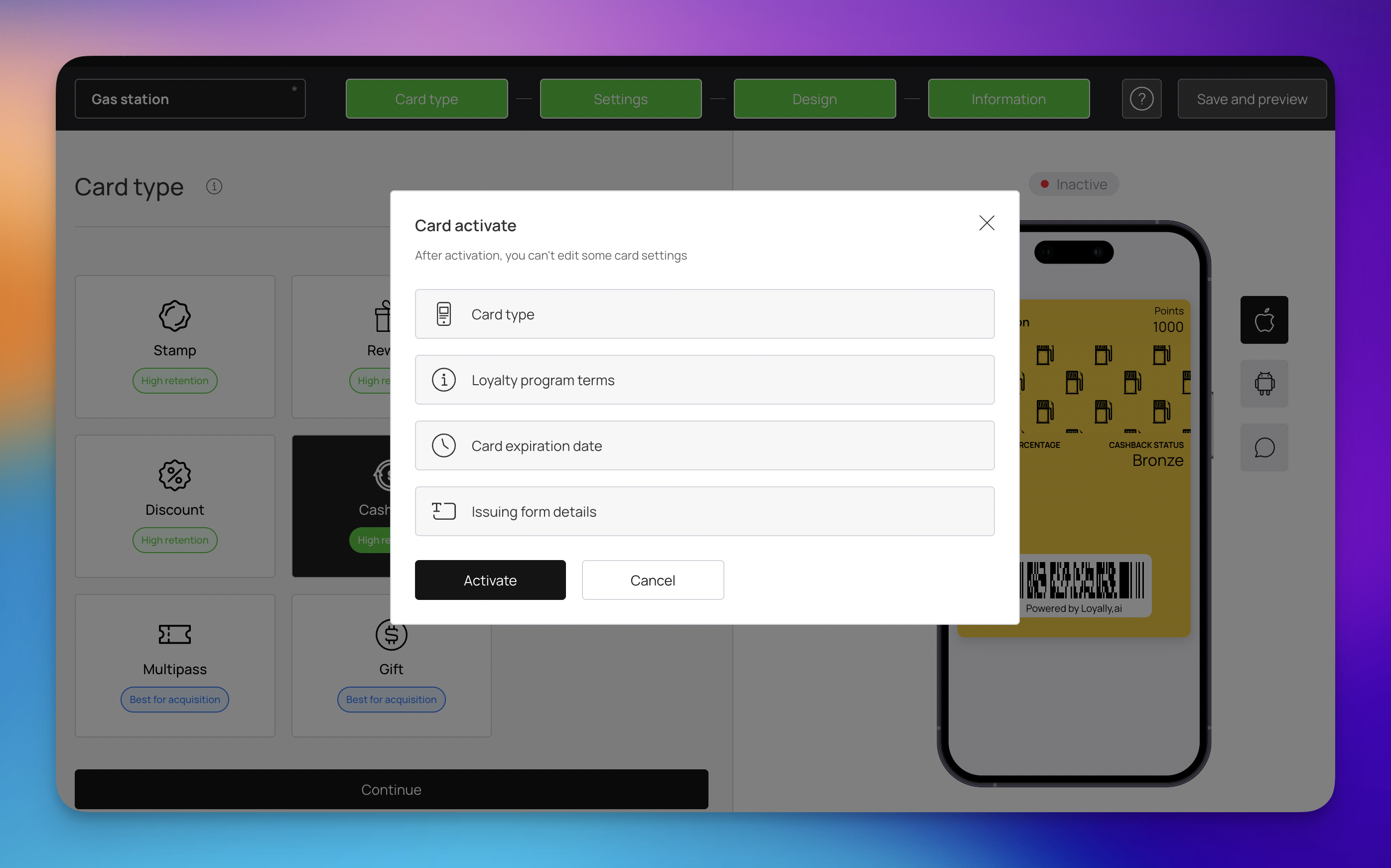
To maintain a consistent experience for your customers and protect the integrity of your data, certain settings are locked once a loyalty card is Active. These restrictions ensure that the "contract" between your business and your customers remains stable while they are participating in your program.
Before looking at specific card types, please note that some fields are restricted across the entire platform.
Regardless of which loyalty program you run, these core settings are frozen upon activation to ensure the foundational structure of your card remains intact:
Card Type: You cannot change the fundamental nature of a card (e.g., turning a Stamp card into a Membership card).
Loyalty Program Terms: The legal or operational rules agreed upon by the user at sign-up.
Card Expiration Date: The preset date or timeframe when the digital card becomes invalid.
Issuing Form Details: The specific structure and fields of the registration form used to collect customer data.

Stamp cards are built on a specific "grid" logic. Because customers are actively progressing toward a goal, the following fields are locked to prevent their progress from being reset or corrupted:
Card Expiration Date: The overall timeframe the card is valid for.
Stamp Life: How long an individual stamp remains valid before expiring.
Card Issuing Form: The fields and requirements set for a customer to get the card.
Stamps Count: The total capacity of the stamp grid.
Stamp Count: The current amount of stamps assigned to active users.
Earned Stamp Message: The automated notification sent when a stamp is added.
Earned Reward Message: The notification triggered when a reward is unlocked.
Multi Rewards: The configuration of tiered rewards across the stamp journey.
Membership cards often involve specific tiers or subscription-like benefits. Because your members join based on a specific set of promised perks and price points, core structural settings are frozen to prevent a breach of those membership terms:
Collect Payments: The setting that determines if the membership is free or paid.
Membership Expiration: The rules governing when a membership status ends.
Membership v1 Toggle: Legacy versioning settings that ensure system stability.
Membership Tiers: Comprehensive tier details cannot be changed, including:
Tier Name: The branding of the specific level (e.g., Gold, VIP).
Description: The text explaining the tier to the user.
Pricing: The cost associated with joining that tier (daily, weekly, monthly, yearly).
Benefits: The specific perks or discounts linked to the tier.
Card Issuing Form: The fields and registration structure required to join.

Coupon cards are typically designed for one-time use or specific promotional events. To prevent the terms of the offer from changing while customers are holding the coupon in their digital wallets, the following fields are locked:
Card Expiration Date: The final date the coupon can be redeemed.
Linked Card Template: The connection to other loyalty cards or programs.
Reward for the First Visit: The specific perk or discount granted upon the first scan.
Card Issuing Form: The information required for a customer to claim the coupon.
Gift cards represent a prepaid value or a specific stored balance. To ensure the financial security of the card and maintain a clear audit trail for both the business and the recipient, the following fields are restricted:
Card Expiration Date: The period during which the gift card value must be used.
Lifetime Points: The historical tracking of points or value associated with the card.
Card Issuing Form: The registration fields used to identify the card owner.
Multipass cards combine several functionalities into a single interface. Because these cards manage complex interactions across different reward types, the following core logic and tracking fields are locked:
Card Expiration Date: The final date the multipass remains valid.
Stamp Life: The validity duration for stamps earned within the pass.
Lifetime Points: The historical record of total points accumulated.
Card Issuing Form: The mandatory fields required for a user to sign up.
Stamps Count: The total number of stamps required or currently held.
Number of Points for Using the Card: The specific amount of points awarded to a customer each time they use the card.
Cashback cards function as a digital wallet for stored value. To ensure financial transparency and prevent inconsistencies in how funds or status are managed for existing holders, the following fields are locked:
Card Expiration Date: The timeframe the cashback card remains valid.
Lifetime Points: The cumulative record of all cashback points earned over time.
Cardholder Status: The specific level or standing assigned to the user within the program (bronze, silver or gold).
Card Issuing Form: The data fields used to register the customer for the cashback program.
This table provides a high-level overview of which core features are locked once your cards are active. Use this as a checklist before hitting the ‘Activate’ button.
Fields | Stamp | Membership | Coupon | Gift | Multipass | Cashback |
Card Type | greyed out🔒 | greyed out🔒 | greyed out🔒 | greyed out🔒 | greyed out🔒 | greyed out🔒 |
Card Expiration Date | greyed out🔒 | greyed out🔒 | greyed out🔒 | greyed out🔒 | greyed out🔒 | greyed out🔒 |
Issuing Form Details | greyed out🔒 | greyed out🔒 | greyed out🔒 | greyed out🔒 | greyed out🔒 | greyed out🔒 |
Loyalty Program Terms | greyed out🔒 | greyed out🔒 | greyed out🔒 | greyed out🔒 | greyed out🔒 | greyed out🔒 |
Stamp Life / Count | greyed out🔒 | greyed out🔒 | ||||
Lifetime Points | greyed out🔒 | greyed out🔒 | greyed out🔒 | |||
Tier Pricing / Benefits | greyed out🔒 | |||||
First Visit Reward | greyed out🔒 | |||||
Points for Card Use | greyed out🔒 | |||||
Cardholder Status | greyed out🔒 |
Card Distribution - Offline
Distribute your loyalty card offline in the local store
Card Distribution - Online
Distribute your loyalty cards online via the different channels
Card Marketing Kit: Boost Loyalty Sign-Ups Offline
Download a print-ready professional marketing kit for offline card distribution