While Loyally.ai provides preset segments for general use, creating your own custom segments allows you to target the specific nuances of your unique business model. Custom segments give you the flexibility to combine niche filters that ensures your marketing messages reach the most relevant audience possible. By moving beyond presets, you can increase conversion rates and avoid sending generic offers to customers who don't fit the standard mold.
Building a custom audience is a straightforward process that allows you to save any combination of filters for future use in your marketing campaigns.
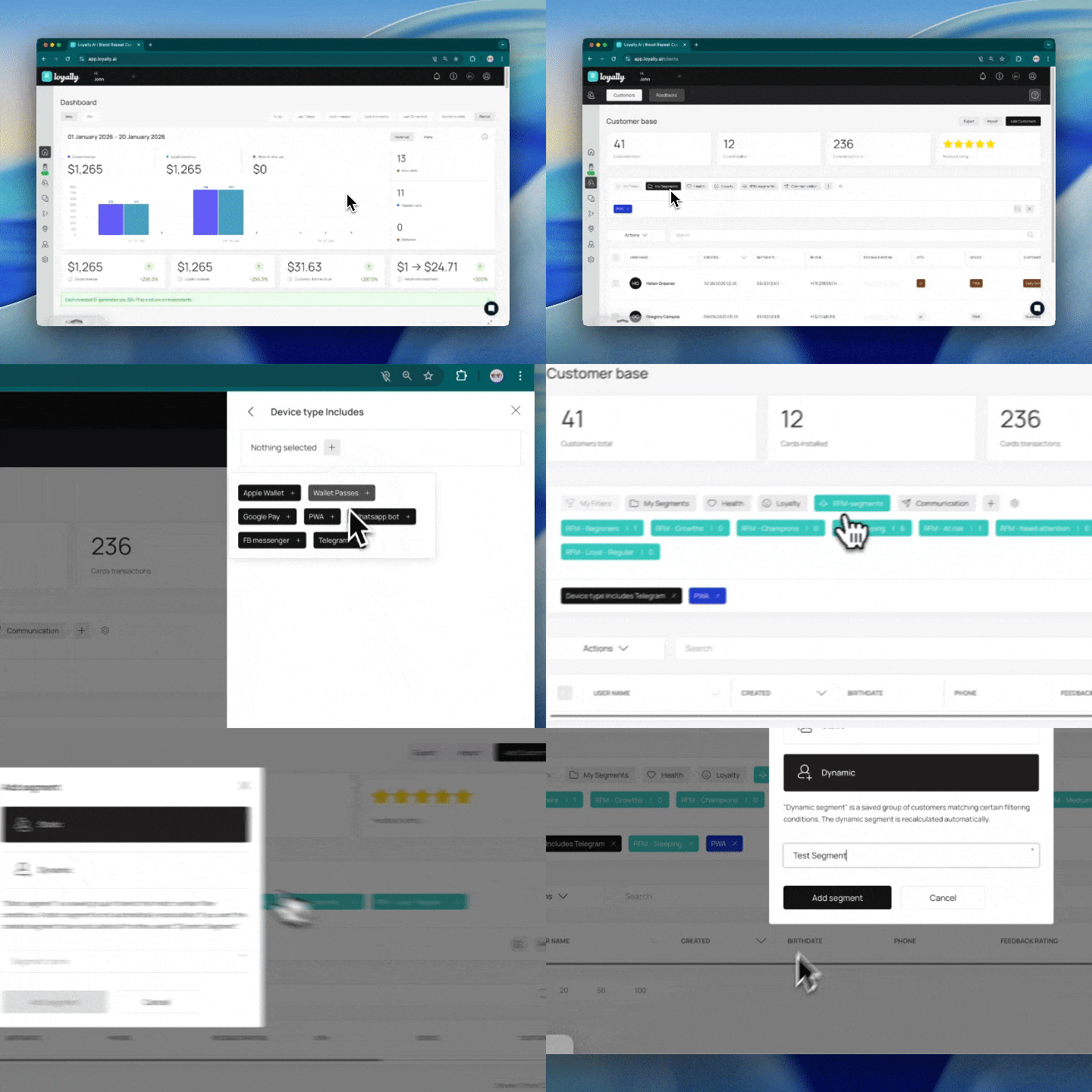
Log in to your Loyally.ai account to access your main administrative dashboard.
Go to the customers dashboard where you can manage and view your entire client list.
Select the filters you want to add in your segments to isolate specific customer behaviors or demographics.
Click the folder icon once you have finished selecting your criteria to open the saving menu.
Choose Dynamic or Static depending on whether you want the group to update automatically or remain a fixed list of clients.
Choose a name for your segment that clearly describes the group you have filtered.
Click 'save segment' to finish the process and store your new customer group.
To get the most out of your segmentation strategy, consider these recommendations for managing your customer data effectively.
Use Dynamic segments for automated marketing 🚀 Automating your workflows with Dynamic segments ensures that customers receive "Welcome" or "Win-back" messages the moment they meet your criteria without manual exports.
Apply clear naming conventions 🏷 Include the date or the specific goal in the segment name to help your team distinguish between similar groups like "High Spenders Q1" and "High Spenders Q2."
Review your filters regularly 🔍 Business needs change, so it is a good practice to audit your saved segments every few months to ensure the filter logic still aligns with your current sales goals.
Test segments before launching campaigns ✅ Before sending a mass communication, quickly scan the list of customers within your new segment to verify the filters are capturing the intended audience.
Leverage Static segments for historical reporting 📉 Use Static segments when you need to freeze a moment in time, such as recording everyone who participated in a specific holiday event.
Related Articles
What is RFM Segmentation?
RFM Segmentation in Loyally.ai
How to Distribute Cards Based on Manually Created Customer Segments?
Sending Targeted Rewards to Your Manually Created Customer Segments