Integrating Google Tag Manager (GTM) with your Loyally.ai account is the most efficient way to track customer interactions and manage marketing pixels without touching a single line of code.
Once connected, you can trigger loyalty events and sync data across your entire marketing stack seamlessly.
Log in to Google Tag Manager.
On the All accounts page, locate your company or account name.
Find the specific website or container you wish to connect.
Identify the ID under the Container ID column. It will be a string starting with "GTM-" (e.g., GTM-M7MBVG8K).
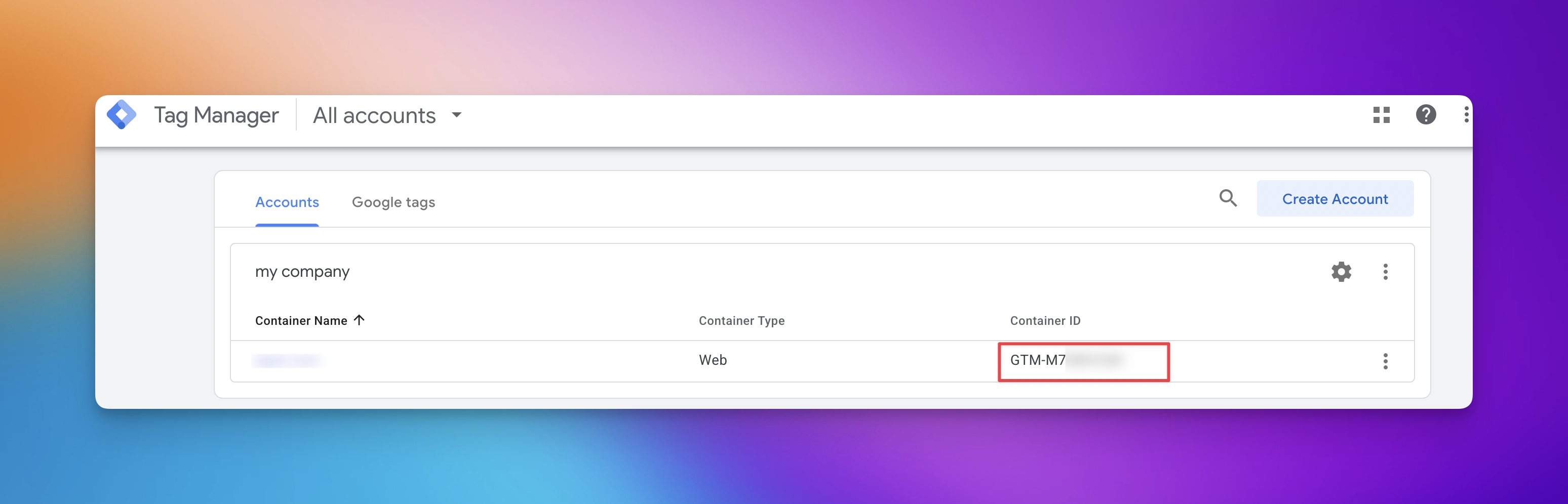
Copy the Container ID and open your Loyally.ai Dashboard.
Once you have retrieved your GTM Container ID, you can complete the integration within your Loyally.ai dashboard. This connection allows the platform to install external services and tracking scripts automatically.
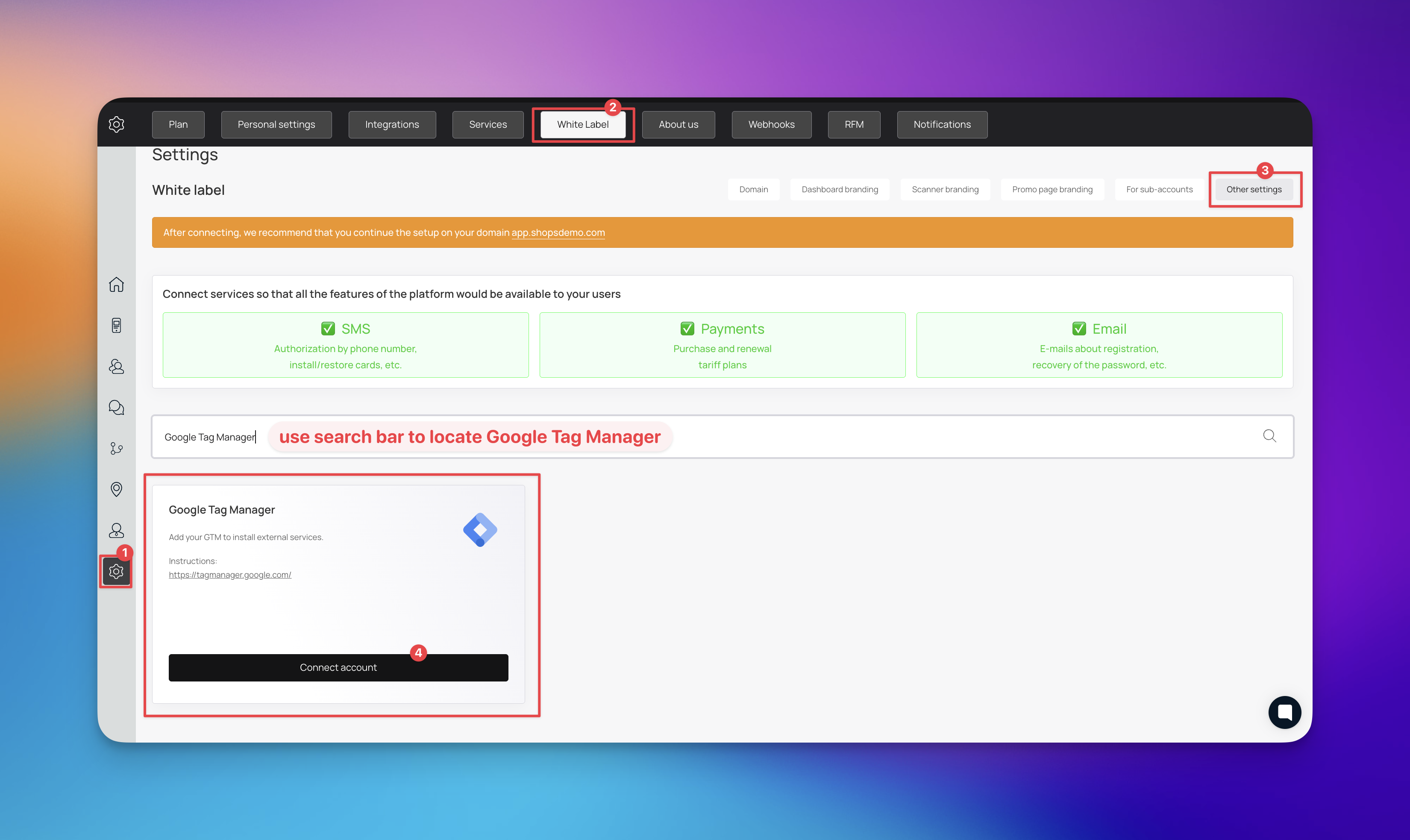
Log in to your Loyally.ai dashboard and select the 'Settings' gear icon.
Select the 'White Label' tab from the top navigation menu.
Select the 'Other settings' option located on the right of the sub-menu.
Use the search bar to find Google Tag Manager.
Within the Google Tag Manager card, select the 'Connect account' button.
Paste your GTM Container ID into the provided field and save your changes.
Select the 'Connect' button to finalize the process.
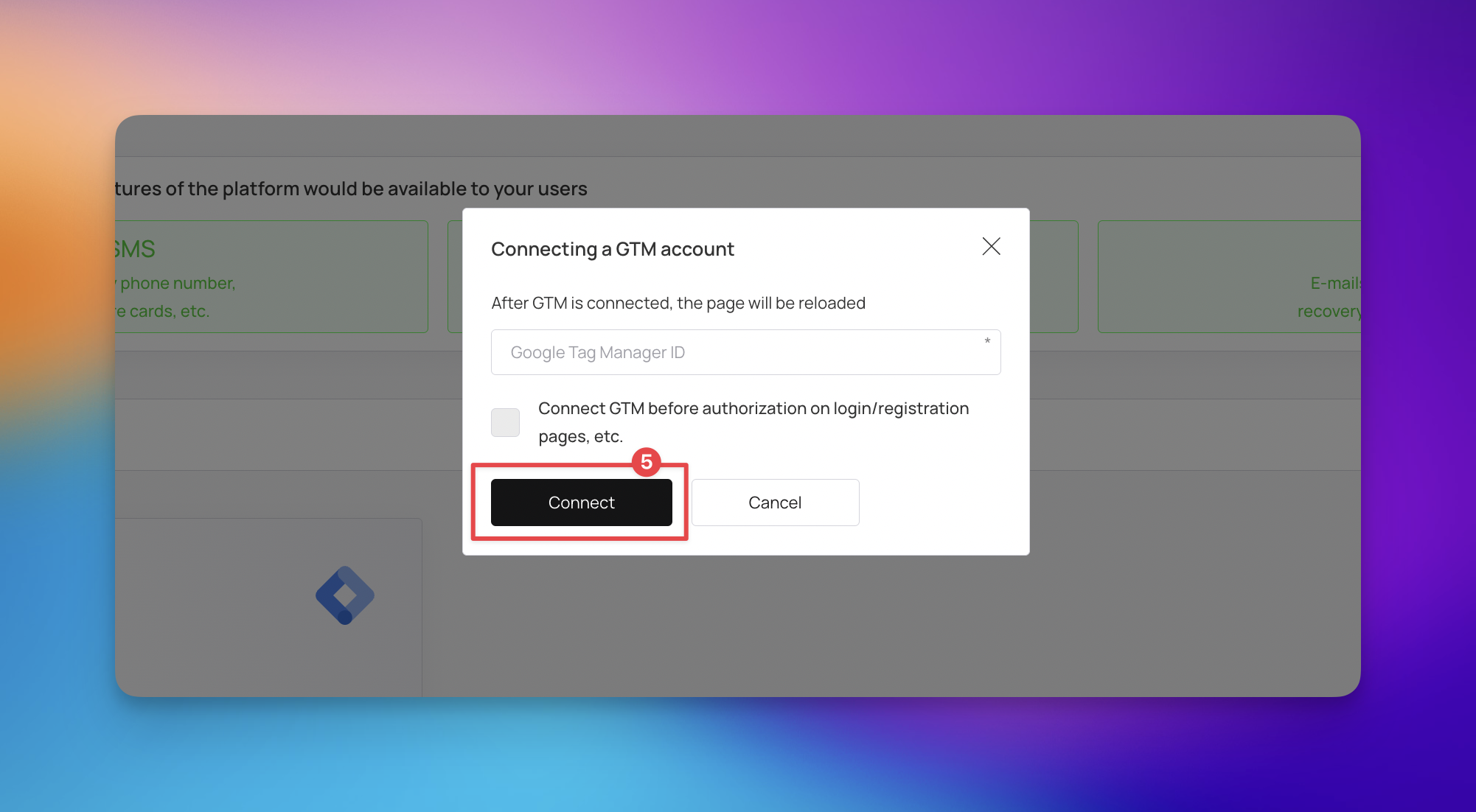
The page will automatically reload once the connection is successful.
Your Google Tag Manager is now fully synced with your loyalty program to ensure seamless data tracking. You can now manage all your marketing tags and analytics scripts directly through your GTM workspace without further technical adjustments.

While the connection process is straightforward, you may encounter specific errors depending on your GTM container settings or browser configuration. Use the table below to identify and resolve common issues.
Error / Issue | Possible Cause | Workaround |
GTM Not Found | Incorrect ID or the ID was entered without the GTM prefix | Double check the ID in GTM and ensure it is pasted exactly as GTM-XXXXXXX |
Tags Not Firing | The GTM container is not published or is in Draft mode | Open your GTM workspace and select the Submit button to publish your latest version |
Widget Not Visible | A Content Security Policy (CSP) is blocking external scripts | Update your website headers to allow scripts from googletagmanager.com and loyally.ai |
Data Mismatch | Multiple GTM containers are installed on the same page | Remove any redundant GTM scripts from your website header to prevent duplicate firing |
Connecting GTM isn't just about installation; it is about leveraging data for better retention.
High-Value Conversion Tracking Instead of just tracking clicks, send "Points Redeemed" events to Google Ads to find more customers who actually engage with your brand.
Tier-Based Remarketing Create custom audiences for customers who hit a specific VIP level, allowing you to show them exclusive ads.
If a customer reaches a VIP Tier, Loyally.ai sends that event to GTM. GTM then triggers a "VIP Tag" for your Facebook Pixel. Now, you can run a social media ad specifically for VIPs with a "Welcome to the Club" discount, making your marketing feel personal and high-end.
White Label Your Loyally.ai Portal
Step-by-step instructions to set up a custom domain, upload your logos and favicons, choose your brand colors, and configure meta tags—so your customers always see your branding in the Loyally.ai experience.