Richie AI is the intelligent "voice" of your loyalty program. It acts as an automated communication assistant that ensures every push notification sent through Loyally.ai sounds like it was written by a human, specifically for your brand.
Instead of sending generic, one-size-fits-all alerts, Richie AI uses the tone you configure to craft messages that feel personal and relevant to your customers. You can use it to announce new perks, remind members of their points balance, or share a special offer—all while staying consistent with the way you normally talk to your audience.

To manage your Richie AI configuration, follow these steps:
Log in to your Loyally.ai dashboard.
Locate the side navigation menu on the left-hand side.
Click on the Mailings menu.
Within the Mailings section, you will see a dedicated tab for Richie AI.
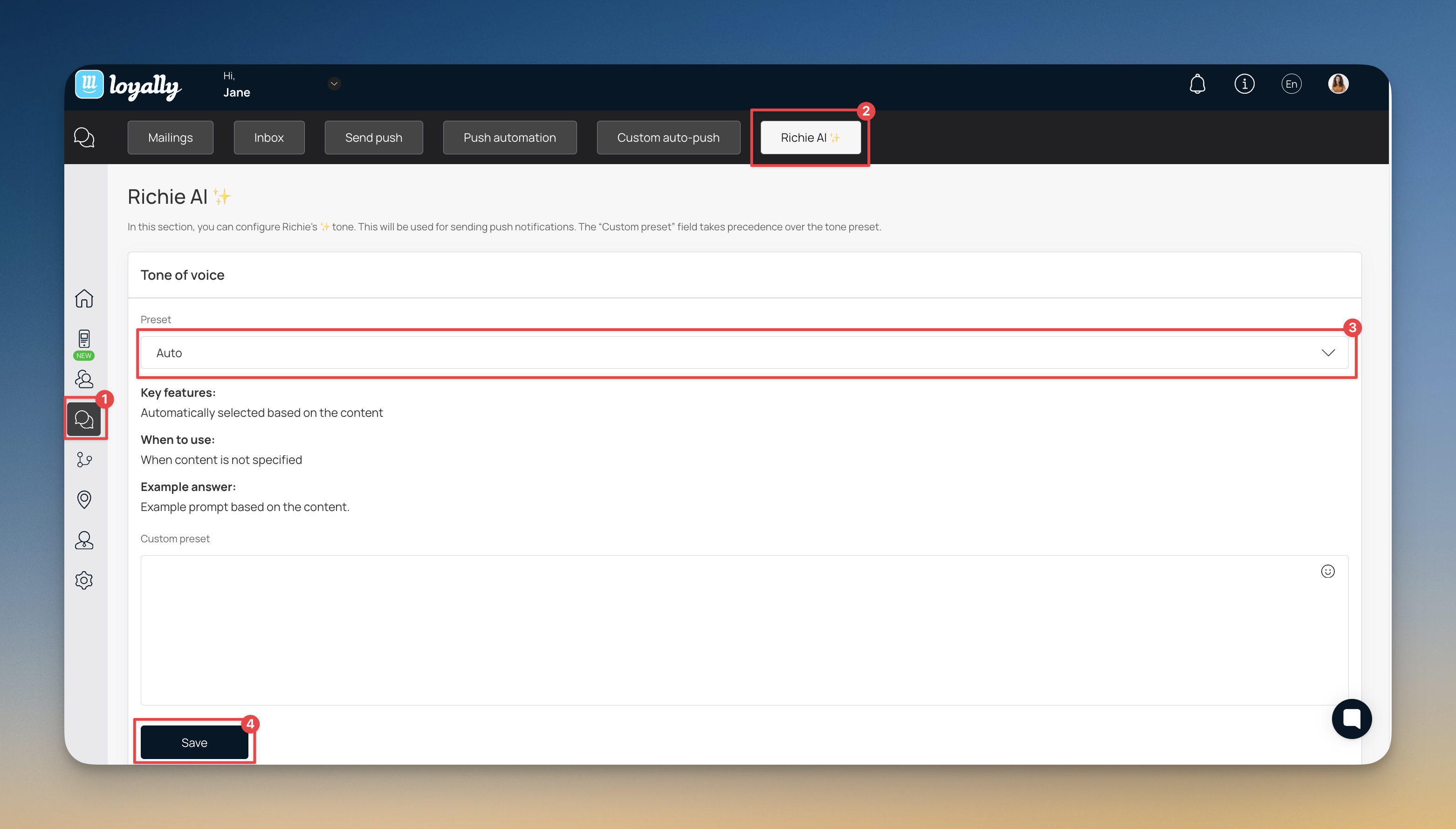
Richie AI allows you to control the personality of your outreach through two distinct types of presets. These settings ensure that every automated message aligns with your brand voice.
These are ready-made configurations built directly into the system for quick implementation. By choosing from a predefined list, you can instantly apply a consistent mood to your outreach without any manual drafting.
How it works: You select a mood like Friendly, Professional, or Exciting from a dropdown menu.
Example: Selecting the "Exciting" preset will automatically adjust Richie's vocabulary to be high-energy and punchy, making it ideal for announcing new product launches or limited-time offers.
If your brand voice requires a more nuanced touch, the Custom Preset field allows you to provide Richie with your own specific set of rules. This is the best option if the standard presets do not perfectly align with your identity.
How it works: you type specific instructions directly into the custom field to guide the AI's writing style.
Example: You can enter a detailed instruction such as: "Use British English, avoid using exclamation marks, and maintain a luxury, high-end feel." This ensures every message adheres to your unique brand guidelines and regional preferences.

Richie AI provides a variety of presets to match your business goals. Selecting the right option helps you communicate more effectively with your loyalty members:
Richie AI Presets | Key features | When to use |
Friendly Assistant | Conversational, open, with emojis | General audience communication, simple tasks |
Neutral / Formal | Reserved, clear, no emotions | Documents, business correspondence |
Expert | Authoritative, well‑reasoned, confident | Education, analytics, consulting |
Engaging / Emotional | Vivid, imaginative, inspiring | Advertising, presentations, social media |
Sales / Conversion | Benefit‑focused, pain‑solving, with a clear CTA | Landing pages, emails, commercial offers |
Premium / Luxury | Refined, prestigious, sophisticated | High‑end products, luxury segment |
Caring / Empathetic | Warm, understanding, gentle | Customer support, negative feedback |
Quick and Concise | Minimum words, straight to the point | FAQ, instructions, short chats |
Motivational / Encouraging | Positive, inspiring | Training, coaching, engagement |
Auto | Automatically selected based on the content | When content is not specified |
Be Specific - In the Custom Preset field, tell Richie exactly what to avoid (e.g., "Do not use slang" or "Always keep it under 50 characters").
Test and Refine - Send a test push notification to your own device to see how your chosen tone translates into a real message.
Update Seasonally - Consider changing your custom preset during holidays or special sales events to make Richie sound more festive or urgent.
Does Richie AI send notifications automatically?
Yes, Richie AI works behind the scenes to rewrite and send notifications based on customer triggers, such as earning points or reaching a new tier.
Can I change the tone for a specific campaign?
The tone settings apply globally to your Richie AI notifications. If you want to change the "vibe" for a holiday sale, you can update your Custom Preset or select a different Preset, and Richie will adapt future messages immediately.
What happens if I leave the Custom Preset field blank?
Richie AI will use whichever option you have selected in the Tone Preset dropdown menu.
How does the "Auto" setting work?
The Auto setting allows Richie AI to analyze the content of the notification and choose the most appropriate tone from the available list. For example, it might use "Friendly" for a welcome message and "Sales / Conversion" for a discount alert.
Can Richie AI speak multiple languages?
Richie AI adapts to the language of your dashboard and the content provided, maintaining your chosen tone across different languages.
Marketing Push
Push Section
How does PUSH notifications work?
Learn more about how push-notifications work on devices